Status Post 03: Even More Cronchy Updates
Nov 25, 2025
Closed Tasks
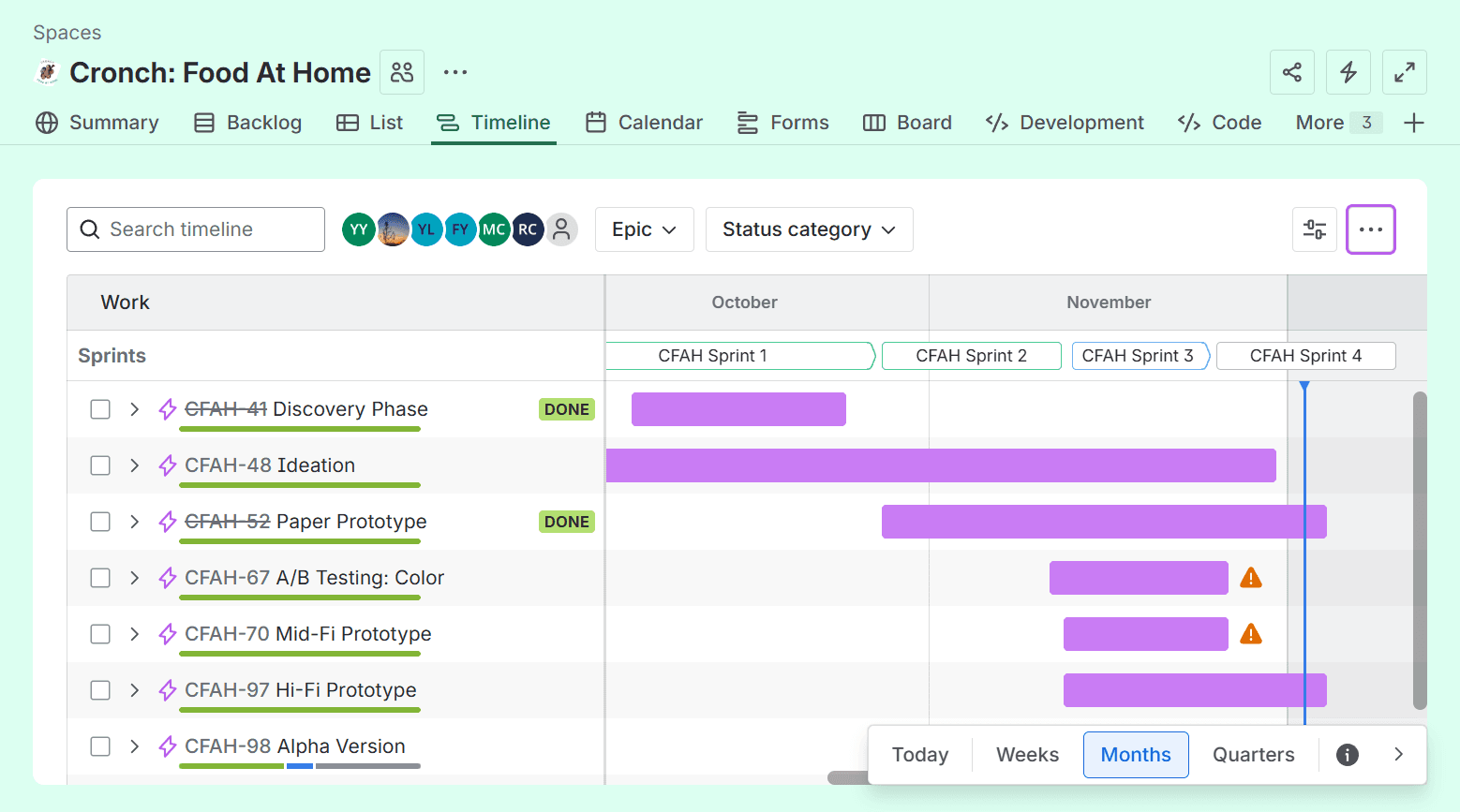
Jira Setup 2.0 - Yi Huan, Yen, Maria
Due Date: 11/11/25
Task Time: Yi Huan (3 hrs), Yen (1 hr), Maria (1 hr)
Description: I had originally created our Jira space using a Kanban template, which restricted access to a lot of features, including sprints, labels, and collaborators. This task involved migrating all content over to a new Jira space and effectively using all features to manage our tasks. Our new Jira space is now much more customized to our working styles, effectively using sprints, epics, and parent/child work items.
Deliverable: Link to Jira
Takeaways:
Sometimes it’s the template, not the platform.
Sprints and epics are great management tools.
Can utilize the “collaborator” feature to add multiple people to a task.
A/B Testing: Color 1.0 Prototypes - Yen
Due Date: 11/12/25
Task Time: Yen (4 hrs)
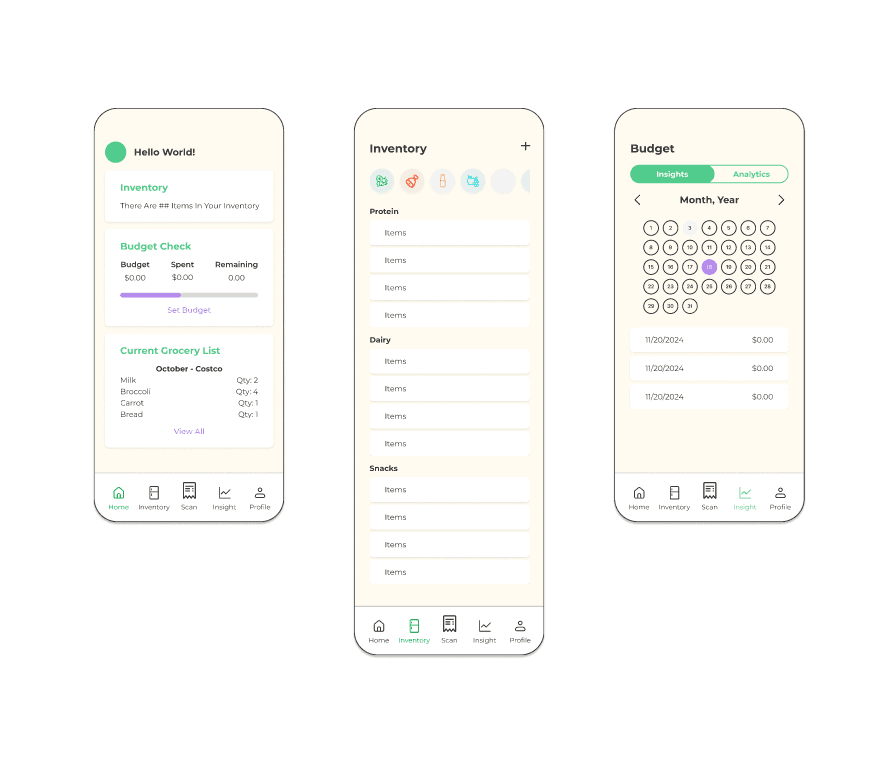
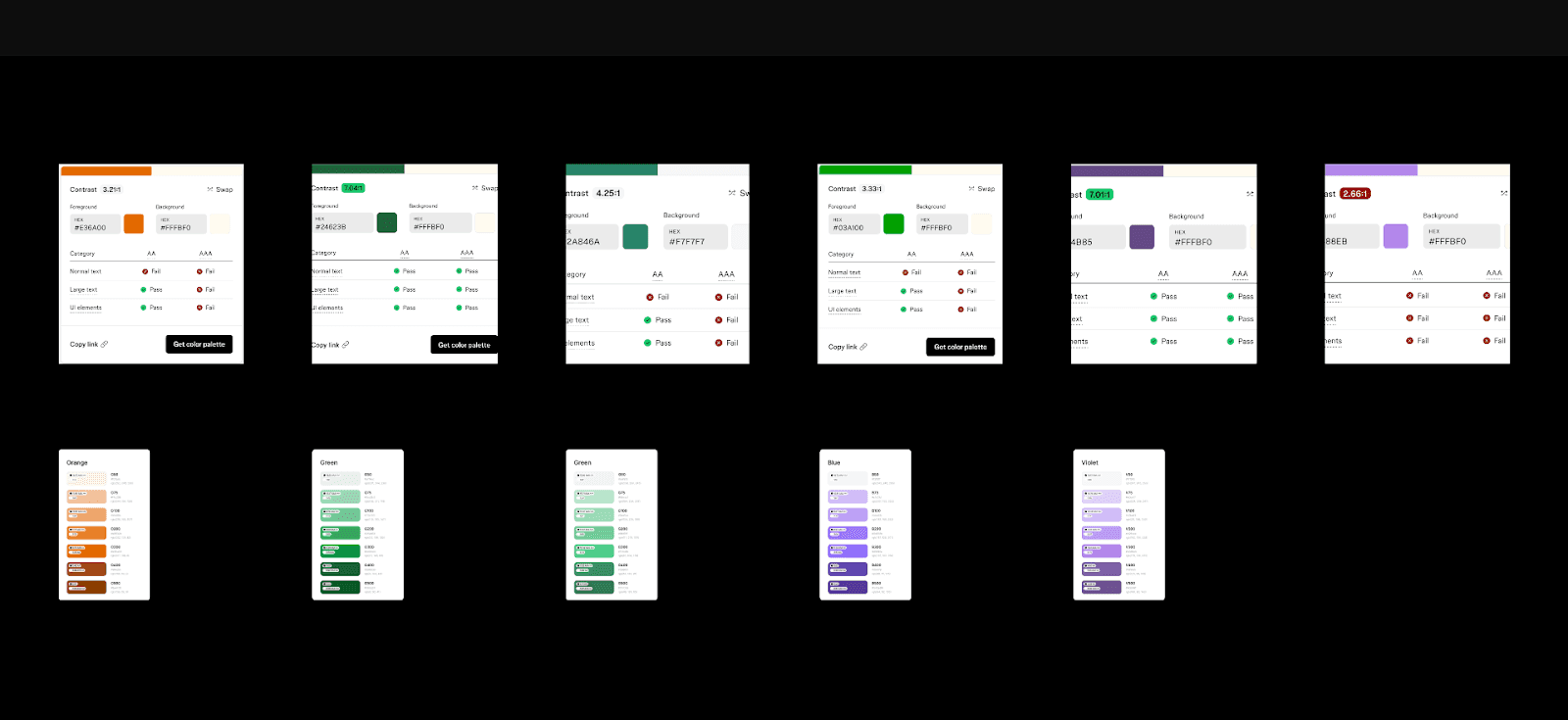
Description: Created a set of three prototype screens implementing three different color palettes.
Deliverable: Color Prototypes and References
Takeaways:
One color palette may be more appealing, but the other color palette may be more accessible
Check against facts not just preference
Paper Prototype FIndings - Sreeja, Fei, Yi Huan
Due Date: 11/13/25
Task Time: Sreeja (1 hr), Fei (1 hr), Yi Huan (2 hrs)
Description: This task involved synthesizing and analyzing all the findings from our different interviews to extract key changes for the design team. The analysis process involved feeding all interview transcripts to ChatGPT to extract repeated feedback, then manually adjusting the findings as a team to be more informative and aligned with what we experienced during the interviews.
Deliverable: Paper Prototype Findings
Takeaways:
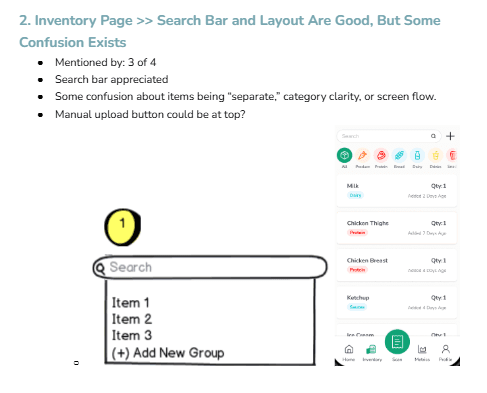
Informed Changes to the user flow:
Manual Item Input >> Upload Fields >> Price, Input Date, Expiry Date
Insights
Rename this navbar item
Provide more distinction between “Insights” vs “Analytics”
Analytics
Have different kinds of graphs
Users want dynamic/custom timeframes and category filters (ex: oct - sept)
Additional filters for how much a user spends on a certain food category
Ex: how much did I spend on meat vs veggies?
Pie chart format or other visual format desired ^
Badges tied to usage, budget adherence, healthy eating, or shopping frequency encourage engagement
You are this far off from becoming the 50th shopper at trader joes!
Spent less than $100 in a grocery run
Make badges(goals) for yourself
I spent $2 on [niche/expensive interests like cheese]
Badges for logging into back for a week straight/month straight
“pro budgeter!” You stayed within your budget this past month!
Healthy eater! – you bought veggies 10x this month
Sweet tooth! – you bought sweets 10 x this month
Buying vegetables
Being under budget
You bought a bunch of stuff on sale
“How to use” section is confusing and needs to be fleshed out more
Changes should be informed by frequency, not what stands out to us
A/B Testing: Color 1.0 Script - Sreeja, Fei, Yi Huan
Due Date: 11/14/25
Task Time: Sreeja (1 hr), Fei (1 hr), Yi Huan (3 hrs)
Description: This script was written with the intention of collecting feedback from users about 3 different color palettes, alignment with branding, and readability.
Deliverable: A/B Testing: Color 1.0 Script
Takeaways:
Writing work can be done remotely by working in phases of drafts.
Write questions that extract data.
Do not write questions that guide/lead users.
Ask questions that compare directly with the previous color palette.
A/B Testing: Color 1.0 Testing - Sreeja, Fei, Yi Huan
Due Date: 11/18/25
Task Time: Yi Huan (1.5 hrs), Fei (1 hr)
Description: We each conducted 2 “A/B Testing: Color 1.0” interviews to collect feedback about our color palette in specific regards to our branding.
Deliverable: Link to Recordings
Takeaways:
It was best to have the user view the prototype on their device so the interviewer could take notes with ease
Having “response” and "explanation" in the script for each question, even if we don’t explicitly ask for an explanation each time, made it easier to document information during the interview
Asking more quantitative questions during the interview helped users feel more confident in their response
A/B Testing: Color 1.0 Findings - Sreeja, Fei, Yi Huan
Due Date: 11/18/25
Task Time: Sreeja (1hr), Fei (1 hr), Yi Huan (3 hrs)
Description:
This task involved synthesizing and analyzing all the findings from our different interviews to extract key changes for the design team. The analysis process extracting feedback according to frequency mentioned, then manually adjusting the findings as a team to be more informative and aligned with what we experienced during the interviews. To effectively visualize data, we used graphs noted frequency by saying “x out of 9 users said…” to validate findings.
Deliverable: A/B Testing: Color 1.0 Findings
Takeaways:
Visualizing the frequency of a concern that was mentioned made helped us feel much more confident in our findings
Helped us separate “necessary changes” from “potential opportunities”
Helped design team scan findings more effectively
People hate the orange
We need to do another round of testing for the color palette
Database Development - Maria, Reuben, Yi Huan
Due Date: 11/18/25
Task Time: Maria (3.5 hrs), Reuben (1.5 hrs), Yi Huan (0.5 hrs)
Description: The lead developer and project manager discussed what information would be required for our database. I took that information and organized them into columns and rows on Google Sheets. Then, I exported the table into a .csv file which was compatible for upload via Supabase. The table is titled “Receipts” and has the following categories: id, receipt_size, store_name, item_name, category, quantity, unit_price, item_total, receipt_subtotal, and created_at. These are receipt placeholders for our Food At Home App.
Deliverable: [live link + live link screenshot]
Takeaways:
The process of exporting .csv files from Google Sheets and importing them into Supabase is straightforward.
The organization of the Table allows our development team to easily read what we have and edit things on an as-needed basis.
Import Icon Library - Maria
Due Date: 11/19/25
Task Time: Maria (1 hr)
Description: Based on the primary UX/UI Designer’s suggestion, the Development team imported a library of icons from Lucide. This installation was imported into our SvelteKit framework. I also created a file named ICONS.md within the GitHub Repository to walk through certain icon folders that made the most sense with each page.
Deliverable: Icons Usage Guide
Takeaways:
This is an easier process than individually gathering and downloading icons because it saves a lot of time.
Lucide is a great resource for a variety of icons.
Create Rootkit - Maria
Due Date: 11/19/25
Task Time: Maria (4.5 hrs)
Description: Based on variables from our Figma - Design file, the developers were told that all the collections were ready to be organized into a rootkit for front-end development. This was done by creating several folders inside src > lib > styles. Styles included another set of folders for brand, color, font, size, and tokens.
Deliverable: Rootkit
Takeaways:
Creating a rootkit makes it manageable for developers to iterate designs throughout the entire app.
When designers update colors or typography, this makes it easy for developers to refer to.
Badge System - Fei, Reuben, Sreeja
Due Date: 11/20/25
Task Time: Fei (1 hr), Reuben (.5 hrs), Sreeja (.5 hrs)
Description:
The badge system was created and sorted into primary and secondary badges that align with our mission. The primary badges include the “Welcome”, “Budget & Savings”, and “Long-Term Milestones”. The secondary badges include the “Waste Reduction & Sustainability” and “Grocery Management” badges. These badges are split between being predictable/measurable milestone badges and surprise badges. We discussed how the badge system would motivate users to use the app, and concluded that it would be a self-motivated system for now. Anything more would be considered scope creep.
Deliverable: Badge System
Takeaways:
In user testing, we received criticism that some users would like the badge system more if there is a reward linked to it or if it were more public-facing. For the future of this app, we may consider giving it a more social platform
Mid-fidelity Prototype - Yen, Fei, Maria
Due Date: 11/21/25
Task Time: Yen (28.5 hrs), Fei (8 hrs), Maria (3.5 hrs)
Description:
Using the findings from both the paper prototype testing and the color validation testing, the design team incorporated all necessary feedback and revisions into the mid-fidelity prototype. From the low-fidelity prototype, we simplified the receipt-scanning process, expanded the options for manually adding items, fleshed out the inventory page, added list/grid view toggles, implemented filtering (oldest first or recently added), applied category tags, completed the main navigation bar, and added the analytics graph. These updates refined user flow, clarified interactions, and improved overall usability.
In the meantime, we refined the primary and secondary color sets based on test results and integrated them into this prototype for the second round of color validation testing. After consolidating all improvements, we ensured the prototype was functional, cohesive, and ready for mid-fidelity user testing.
Deliverable:
Takeaways:
It was very interesting to see how users interacted with our initial color palette and how their feedback shaped the updated version.
Although this prototype required the most time and effort so far, it establishes a strong foundation for the high-fidelity prototype and future iterations.
A/B Testing: Color 2.0 Prototypes - Yi Huan, Yen
Due Date: 11/23/25
Task Time: Yi Huan (1.5 hrs), Yen (0.5 hr)
Description:
The Lead Designer took the feedback from A/B Testing: Color 1.0 to create a new color palette and the Tertiary Researcher implemented the new color palette into prototype layouts to be tested. The new color palette will be tested against the winning color palette from the first round of testing. Version A is the winning color from the previous testing. Version B is the new color palette. We also took this as an opportunity to test the layout of the home page.
Deliverable:
Layout: Version A vs B
Takeaways:
Figma variables made color switching easy
Each screen should be labelled within the prototype as well for clarity
Only one variable can be changed and tested at a time
A/B Testing: Color 2.0 Survey Form - Sreeja, Fei, Yi Huan
Due Date: 11/26/25
Task Time: Sreeja (1.5 hrs), Fei (0.5 hrs, Yi Huan (2 hrs)
Description: We recognized that we had a very short time window to conduct a second round of A/B Testing before Mid Fidelity Prototype so we decided to do this research via survey. We used a lot of questions from our previous script, but made sure to adjust them to suit the survey format.
Deliverable: Link to A/B Testing: Color 2.0 Survey
Takeaways:
Added optional explanation to each question
Link to enlarged images
Keep the first section as short as possible to bring users in
A/B Testing: Color 2.0 Findings - Yi Huan
Due Date: 11/26/25
Task Time: Yi Huan (6 hrs)
Description:
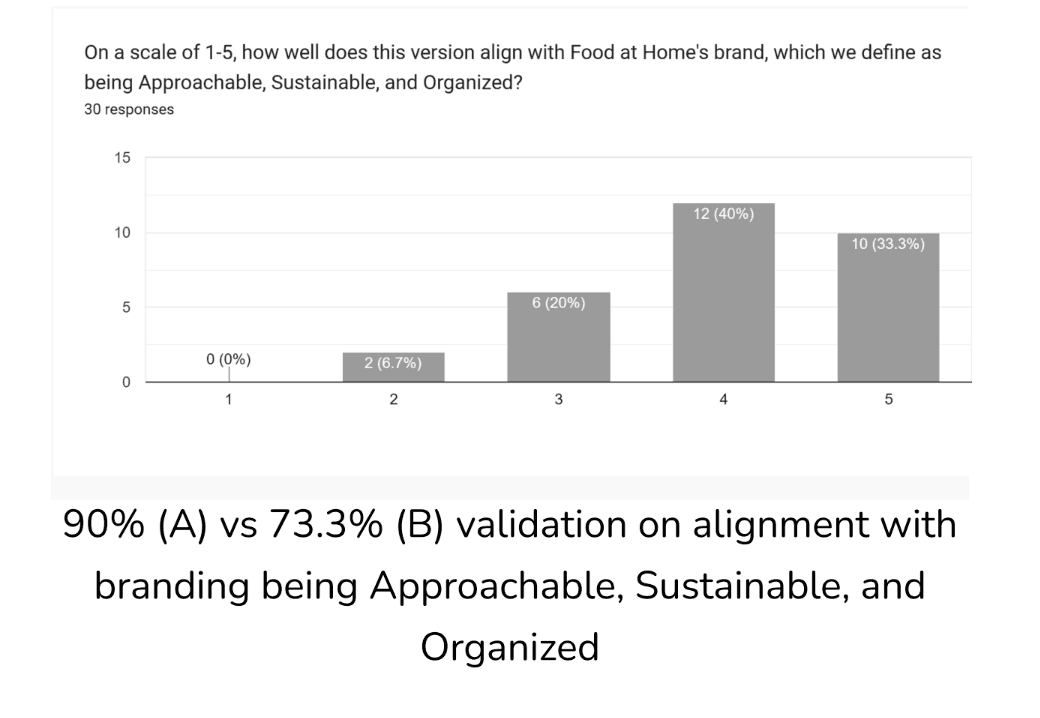
To visualize our findings more effectively, I transferred the form responses to a spreadsheet and created either bar graphs or word clouds. I cleaned the data for questions like “describe __ in three words” and noted how many times each word was mentioned.
Deliverable: Link to A/B Testing: Color 2.0 Findings
Takeaways:
Word cloud is sufficient visualization for the frequency a piece of data appears
Qualitative data, like descriptors, can be visualized using word clouds
Users may prefer one over the other, but designers can make informed decisions if both options receive positive feedback
Data is directly compared so that designers can access the data easier and make informed decisions
Key Finding – Ver A Background was too warm, but Ver B Background was too cool
Mid-fidelity Prototype: Script - Sreeja, Fei, Yi Huan
Due Date: 11/26/25
Task Time: Sreeja (5 hrs), Fei (2 hrs), Yi Huan (6 hrs)
Description: This was our final testing so we wanted to make sure we covered as much information as possible. We divided the script up into sections according to screens >> tabs and asked specific questions pertaining to each user task that pertained to the main flow. We also made sure the script left room for feedback that was unasked for and a plan of action if the user did not go where we expected them to go within the navigation.
Deliverable: Mid-Fidelity Testing Script
Takeaways:
Soft test a long script with a user first
Use Chat GPT to make long scripts as concise as possible
Always leave room for explanation in addition to response
If you can quantify a question in this stage, quantify it so that data analysis will be easier
Mid-fidelity Prototype: Testing - Sreeja, Fei, Yi Huan
Due Date: 11/27m/25
Task Time: Sreeja (2 hrs), Yi Huan (2.5 hrs), Fei (0.5 hr)
Description:
We had one day to conduct interviews, which was Thanksgiving day. Although we aimed for 2 interviews each, we gave each other grace considering the holidays and the expected length of the interview.
Deliverable:
Takeaways:
Write script with more visual text hierarchy to make interview notetaking more efficient
Figure out how to write scripts that accommodate for moments where users go off script/ahead of the game
Although the script was very long already, there were moments where follow up questions helped provide more insight into future opportunities
Mid-fidelity Prototype: Findings - Sreeja, Fei, Yi Huan
Due Date: 11/28/25
Task Time: Yi Huan (2 hrs), Fei (.5 hrs)
Description:
This task involved synthesizing and analyzing all the findings from our different interviews to extract key changes for the design team. The analysis process involved feeding all interview transcripts to ChatGPT to extract repeated feedback. Design changes are informed by frequency of mention, though we also make space and take note of potential opportunities.
Deliverable: Mid-Fidelity Prototype Findings
Takeaways:
Include images to provide clarity to data
Findings should be as detailed as possible…avoid generalizations
Positive findings are just as important to validate current design decisions
Backend Functionality - Reuben
Due Date: 11/30/25
Task Time: Reuben (7 hrs)
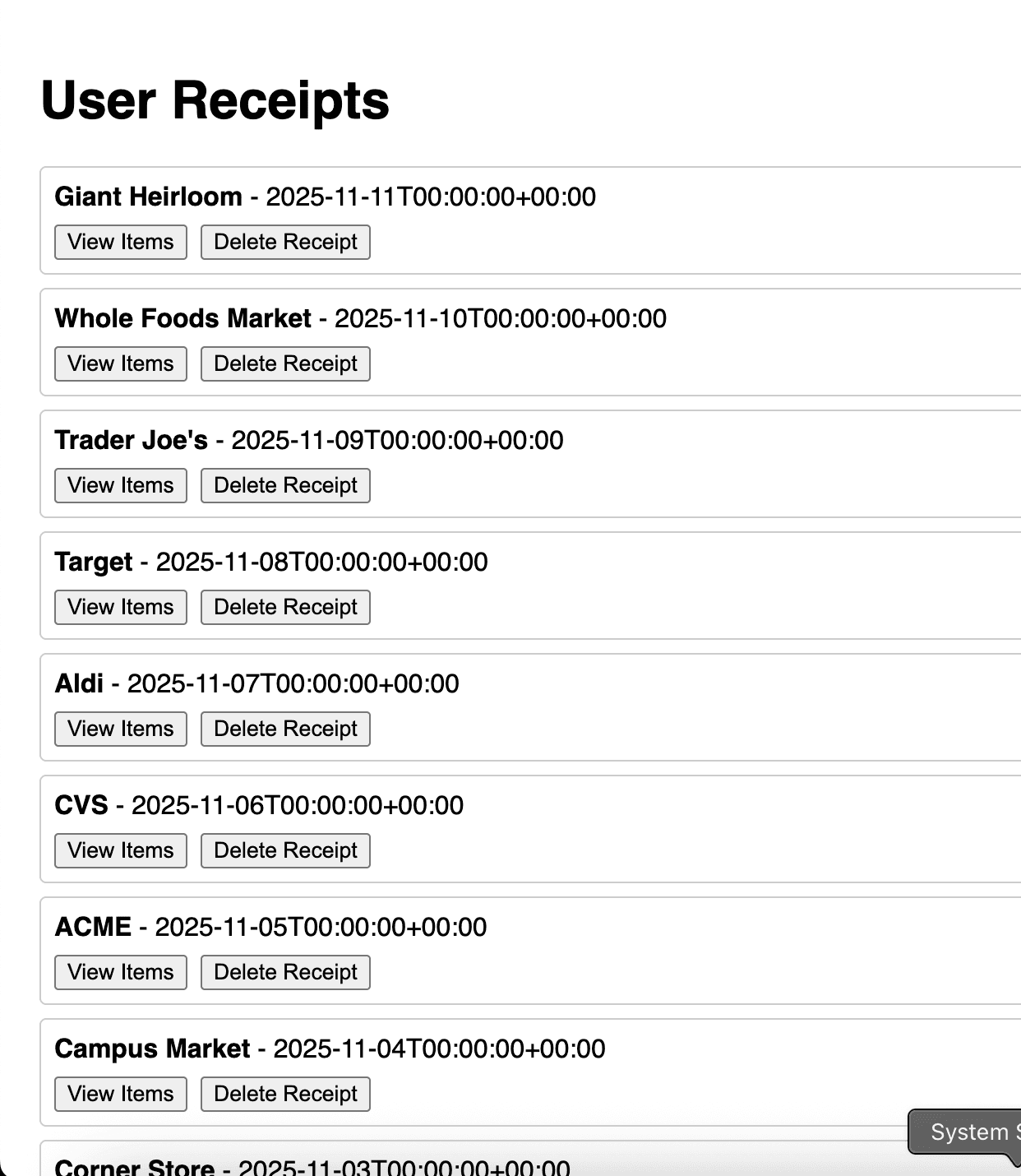
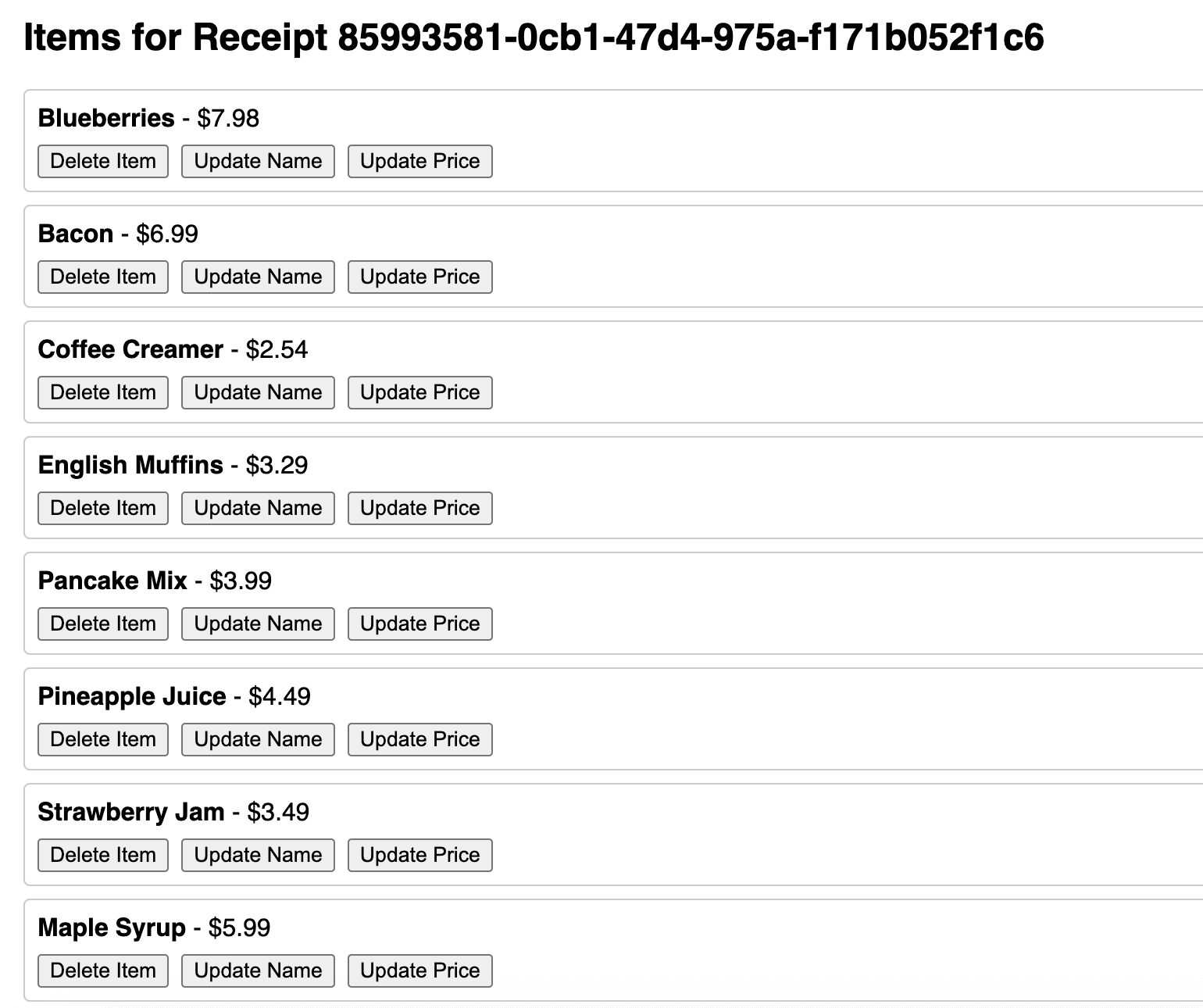
Description: For this task, we reworked part of the database by setting up a user table, separating “Receipts” into “receipts” and “receipt_items” tables, and populating everything with test data to verify functionality. From this, we’ve built core functions that let us retrieve all receipts for a user, view all items within a specific receipt, fetch an individual receipt, and delete or update both receipts and items. These make up the foundation of the system, and while they cover the essential workflows, we expect to expand on them further next quarter as the project changes.
Deliverable: GitHub
Takeaways:
Reworked the database structure by creating a user table, splitting the original “Receipts” table into “receipts” and “receipt_items,” and populating everything with test data to confirm functionality.
Built the core features for retrieving all receipts for a user, viewing items within a specific receipt, fetching an individual receipt, and updating or deleting receipts and items—forming the foundation of the system as it continues to evolve next quarter.
Navigated challenges in SvelteKit, especially around how it determines what data can or cannot be exposed to client-side users when using its built-in commands.
Create Content for “How to Use” - Fei
Due Date: 12/01/25
Task Time: Fei (1 hr)
Description: The content lead created the text and instructions for the how to use sections of the app. This includes instructions for “how to navigate the app”, “how to add an item manually”, and etc.
Deliverable: How to Use…
Takeaways:
This exercise brought attention to the graphs that we are using for our Analytics page. We have to rethink the format of the charts in order for users to understand the content with ease
Hi-fidelity Prototype - Yen, Fei
Due Date: 12/02/25
Task Time: Yen (7 hrs), Fei (2 hrs)
Description:
Using the usability testing findings from the mid-fidelity prototype, the design team compiled and implemented a detailed list of revisions for the high-fidelity version. One of the strongest pieces of feedback was that the Metrics screen felt confusing and not useful, which was concerning since it is one of our core features. To address this, we spent the most time restructuring this area. We combined the Overview and Analytics tabs into a single Insights screen and added more relevant data, including total spent, average per receipt, highest and lowest receipt amounts, and other improved visualizations.
Along with the metrics redesign, we implemented the following changes:
changed meals to leftover
added grid view design
added desserts category
change secondary color
update category navbar color
change icon of metrics
add price input for item added manually
add edit pop-up model for items after scan to edit
fix microinteraction of toss-chomp item card
fix filter dropdown in inventory
add badges system
create badges microinteraction for badges
add how to use guide
If more time were available, we would explore additional enhancements such as:
on boarding screen
logo animation
digital receipts
make different graph
more customize option for shopping list
Deliverable:
Takeaways:
After reviewing feedback from both rounds of color validation testing, I was surprised to see that users preferred our beige-tone background over the gray one, even though the first test showed the opposite. Based on these findings, we decided to keep a warm background tone but refine it by shifting closer to white for improved clarity and balance.
Design System - Yen
Due Date: 12/02/25
Task Time: Yen (3 hrs)
Description:
While working on the mid-fidelity prototype, I also established the design system that includes our color palette, typography, scale, spacing, and core components. This system creates a consistent foundation for the interface and supports smoother collaboration and faster iteration as the design evolves
Deliverable:
Takeaways:
Building the design system improved consistency across prototype screens.
Setting up variables in Figma took time to learn, but it significantly speeds up updates and component management
Having a defined system makes the overall design process more efficient and scalable.
Reward Badges Icons - Yen
Due Date: 12/02/25
Task Time: Yen (2 hrs)
Description:
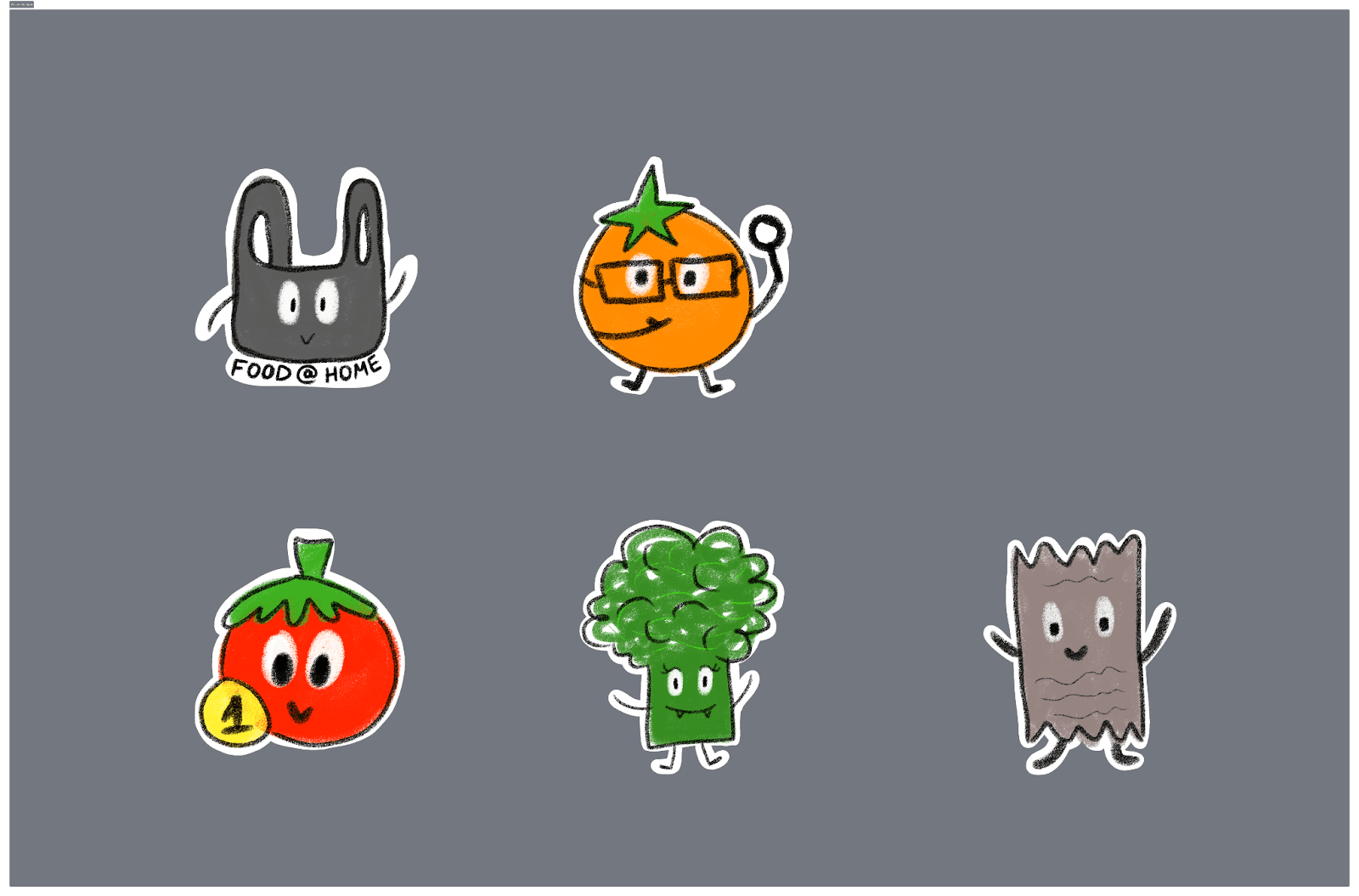
Using the badge system framework developed by the content team, I designed a set of reward badges featuring a food-themed visual style. The goal was to make the rewards feel playful and motivating while staying consistent with the app’s branding
Deliverable:
Takeaways:
This was a fun and refreshing task that helped me take a creative break from the prototype work
Ensured badges effectively represent each achievement tupe
Created designs that are both motivating and thematically relevant to food
Reorganizing Teams and Google Drive Content Systems - Fei, Yi Huan
Due Date: 12/02/25
Task Time: Fei (4 hrs), Yi Huan (2 hrs)
Description:
The Google Drive and Team filing system continues to evolve as we add in new deliverables. We reorganized the folders to be numbered numerically to reflect the order in which deliverables were done.
Deliverable: Google Drive
Takeaways:
It helps us stay organized to have our folders numbered
Minimizing the amount of subfolders in each of the main folders help a lot with minimizing traffic
Status Post 03 - Maria, Reuben
Due Date: 12/2/25
Task Time: Maria (3 hrs), Reuben (1 hr)
Description: Status Post 03 is a required assignment for our Junior Project class. It involves documentation of closed tasks, open tasks, and new tasks. This allows our potential stakeholders, classmates, and the general public to view our progress via Framer.
Deliverable: Status Post 03
Takeaways:
Our Food At Home App is approaching the final deliverable – a high-fidelity prototype.
Now that this is our third status post, the process of ensuring the team is on the same page has become easier.
This page not only provides a visual of our teamwork to stakeholders, but it also serves as a resource for our own team to consistently refer to.
Open Tasks
Style Guide - Yen, Fei, Maria
Due Date: 11/23/25
Description: After completing the high-fidelity prototype, the design team will gather one additional round of feedback to refine visual details and ensure consistency across all components. Once these refinements are made, we will finalize the style guide, documenting the approved typography, color palette, logo usage, iconography, spacing, and UI components. This style guide will also serve as a foundational document for building the case study later on.
Components - Maria
Due Date: 12/02/25
Task Time: Maria (6 hrs)
Description: Our UX/UI Designers indicated the following components were ready to be implemented onto the Food At Home App: navigation bar, pop-up modals, item lists, scanning receipt flow, dropdown menus, a form for manually adding items, data (graphics, bar charts, etc.), and a filtering/sorting view.
Final Presentation Slide Deck Rough Draft - All Team Members
Due Date: 12/05/25
Description: The project manager has created the slide deck according to the presentation structure and populated it with some items.
Final Presentation Slide Deck Final Draft - All Team Members
Due Date: 12/06/25
Description: We will be rehearsing the presentation Saturday evening so the due date so we will make any final adjustments on this file.
Change data graph in analytics page - Yen, Fei, Maria
Due Date: 12/06/25
Description:
During usability testing, several users mentioned that the analytics graph was confusing and difficult to interpret. To address this, the design team will take additional time to discuss and explore alternative visualization methods. Our goal is to redesign the graph in a way that better communicates spending patterns and key insights, making the data clearer, more meaningful, and more actionable for users.
New Tasks
Final Presentation Rehearsal 1 - All Team Members
Due Date: 12/06/25
Description: All team members will show up to rehearse our presentation and make final revisions to our presentation.
Final Presentation Rehearsal 2 - All Team Members
Due Date: 12/08/25
Description: All team members will show up to rehearse our presentation for one last time.
Meetings:
All-hands Meeting: (11/11/25) | 1.5 hrs
Attendees: All team members present and on time
Meeting Agenda:
General Updates
Update your section with what you will update the team about (5 min)
Status Post 02 Feedback/Changes:
Jira: (Yi Huan)
Add a link to the Jira so it can be accessible by the people who have access
Supabase: (Maria)
Add the link to Supabase
Be able to prove the deliverable through an active link, not just images
API integration
Add testing branch to GitHub where it can be tested to see if it works online (Maria)
Add the link to that onto the Status post (Maria)
Rename Maria’s branch
Survey Link (Sreeja)
Food At Home - User Survey Responses
Add a link to responses?
Confidentiality statement
Copy the chart links?
Have all the charts in one html page?
Keep responder survey
Put all charts onto a google doc
Paper Prototype Interview (Yi Huan)
Switch link to: Paper Prototype Interview Script
Paper Prototype Recordings:(Yi Huan)
Should be all good
Add the recordings for the prototype testing
Status Post 03
Jira
I cleaned up the jira and it looks a lot cleaner now!
Design
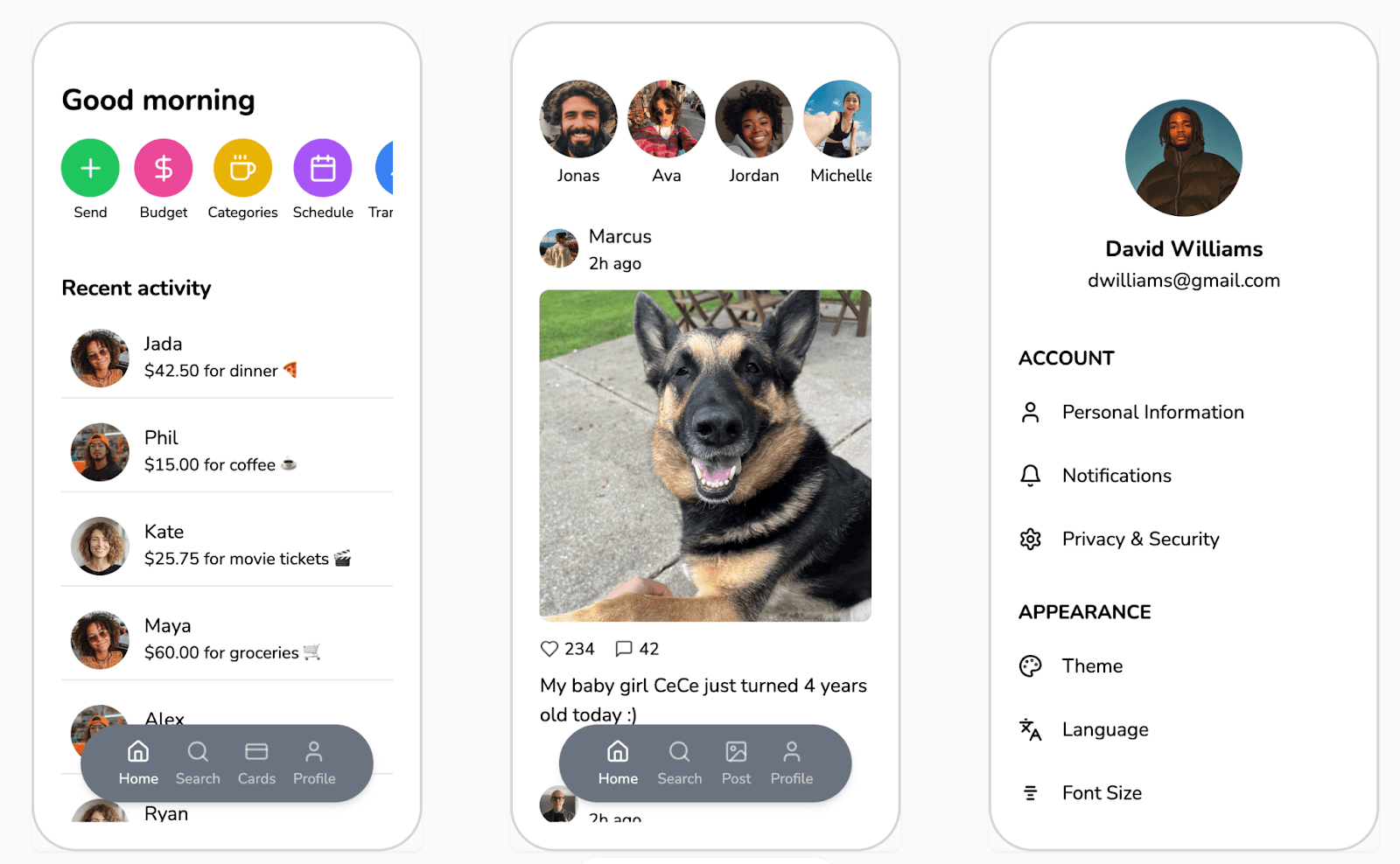
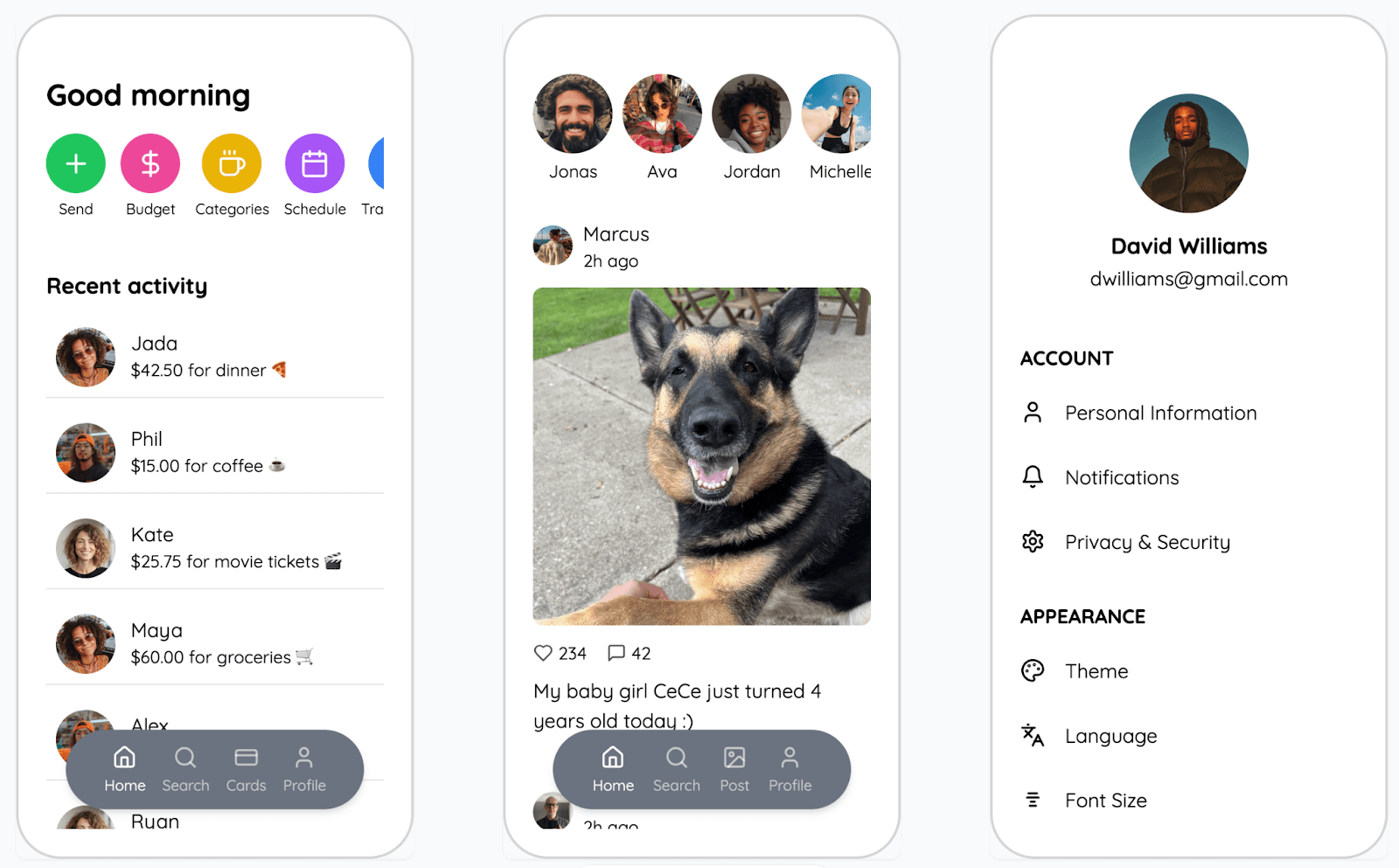
Color and typography validation testing draft (compare between nunito and quicksand)
Research team will clean up the AB testing doc to conduct AB testings
A: Quicksand (top) | B: Nunito (bottom)
Typography should feel financial based with homey feelings
2nd round of logo sketch
Looking at fonts and drawings for the text inside the bag
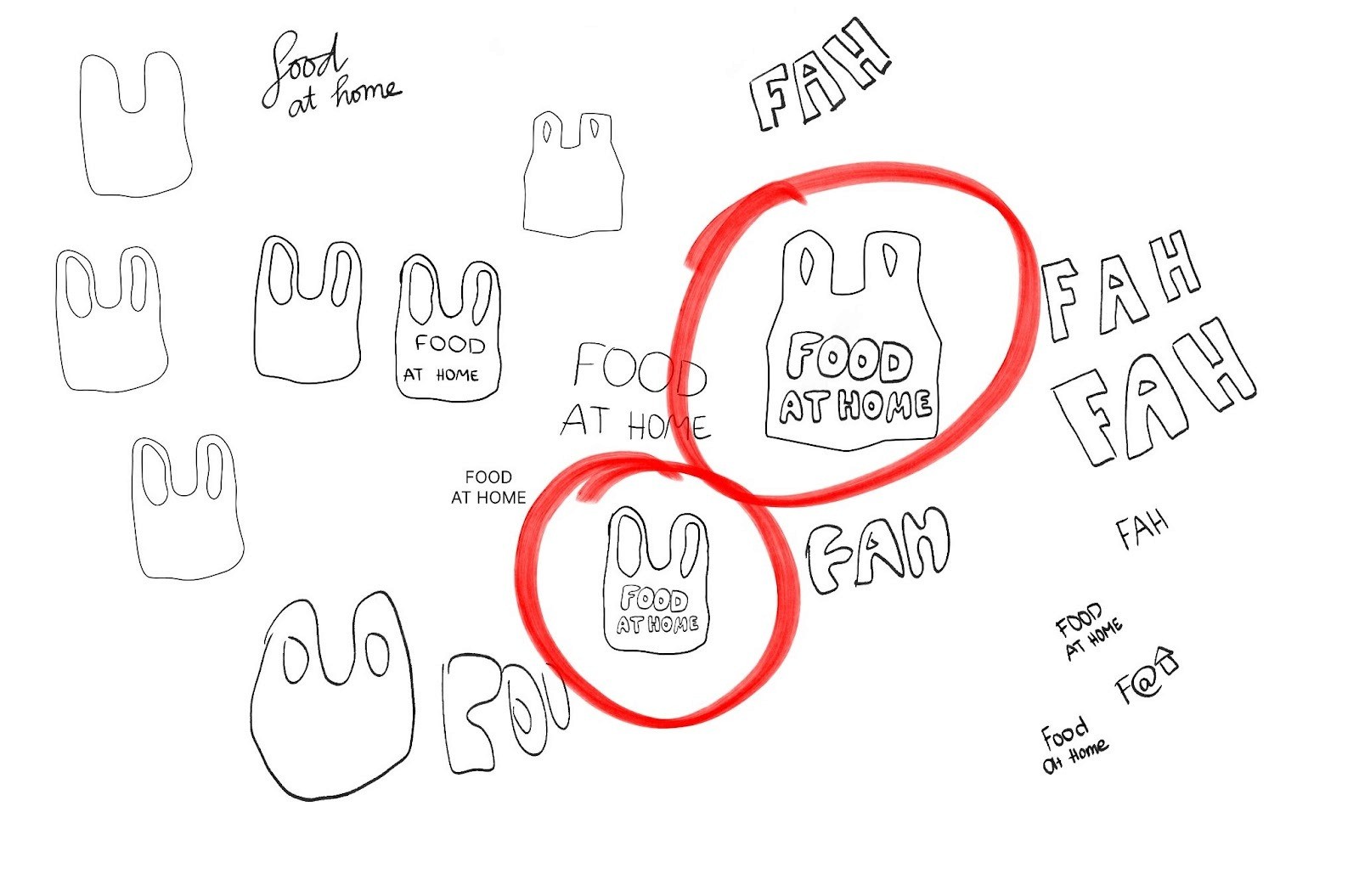
Look for font for the logo - refer to design meeting tab
Yen will send inspo/references for fei and maria to help look for fonts!
Two different bag styles
Hmmmmmm idk maybe mid-fi prototype?
Timeline: A/B Testing by 11/18 and then Midfi
Should we do moodboard?
No - it is color focused, and we already have a good idea of what our palette is
No - it is not within our bandwidth
Research
Completed
6 interviews have been completed for Paper Prototype testing
All recordings and assets in file
To Do
Analyze interviews individually by Wednesday’s meeting and consolidate findings together
Analyze/organize interview notes individually
Wednesday Meeting
Discuss findings
Reflect on interviews
Prepare for A/B testing (due by the 18th)
Revise the script and finalize (Wednesday)
Create a form and set it up for versions of the design (Wednesday)
Set up for 2 A/B tests per person by next Tuesday - 11/18)
Content/research - Fei will upload photos of the paper prototype for the case-study
Pictures of users interacting with the paper prototype
Pictures of paper prototype setup
Fei will download jpg/png of AB testing items for research team
Yen will place finalized deliverables in a “done” section for research team handoff
Development
Completed
Status Post 02!
API Integration
Continue with Spoonacular API & Tesseract.js? – Yes
MARIAAAAAAAAAAAAAAAAAAAAAAAAAAAAAAAAAAAAAAAAAAA =3=
In Progress
Reuben update Jira tasks
To Do
Functionality
Database development
Supabase is connected, but there is no information in it
Frontend
Begin creating components pulled from SvelteKit lib, codepen.io, VSCode plugins, etc.
Questions
None
Content
Completed
Organized, compressed, and converted all deliverables
In progress
Convert files in WebP
Upload Framer banners into their respective folder
Action Items
Create various components via SvelteKit 5
Find options for typography that feel homey and financial-based
Look for fonts for inside of our bag (bubble letters, but not super rounded – refer to Yen’s current findings)
A/B TESTINGGGGG
All-hands Meeting: (11/14/25) | 1.5 hrs
Attendees: Yi Huan, Sreeja, Fei, Yen, Reuben (Maria async)
Meeting Agenda:
General Updates
Update your section with what you will update the team about (5 min)
Jira is finally fully ready for use!! - yay
Completed tasks have been fully updated
Team leads please be sure to update in progress + new tasks as you work
Team leads with workflow becoming more consistent, please try to plan out tasks that span out til the end of this term
Design
Update:
Waiting on color validation test feedback
Font choice:
Quicksand for heading
Nunito for body
Keeping font size for now bc there is minimal feedback about that; will adjust as we go
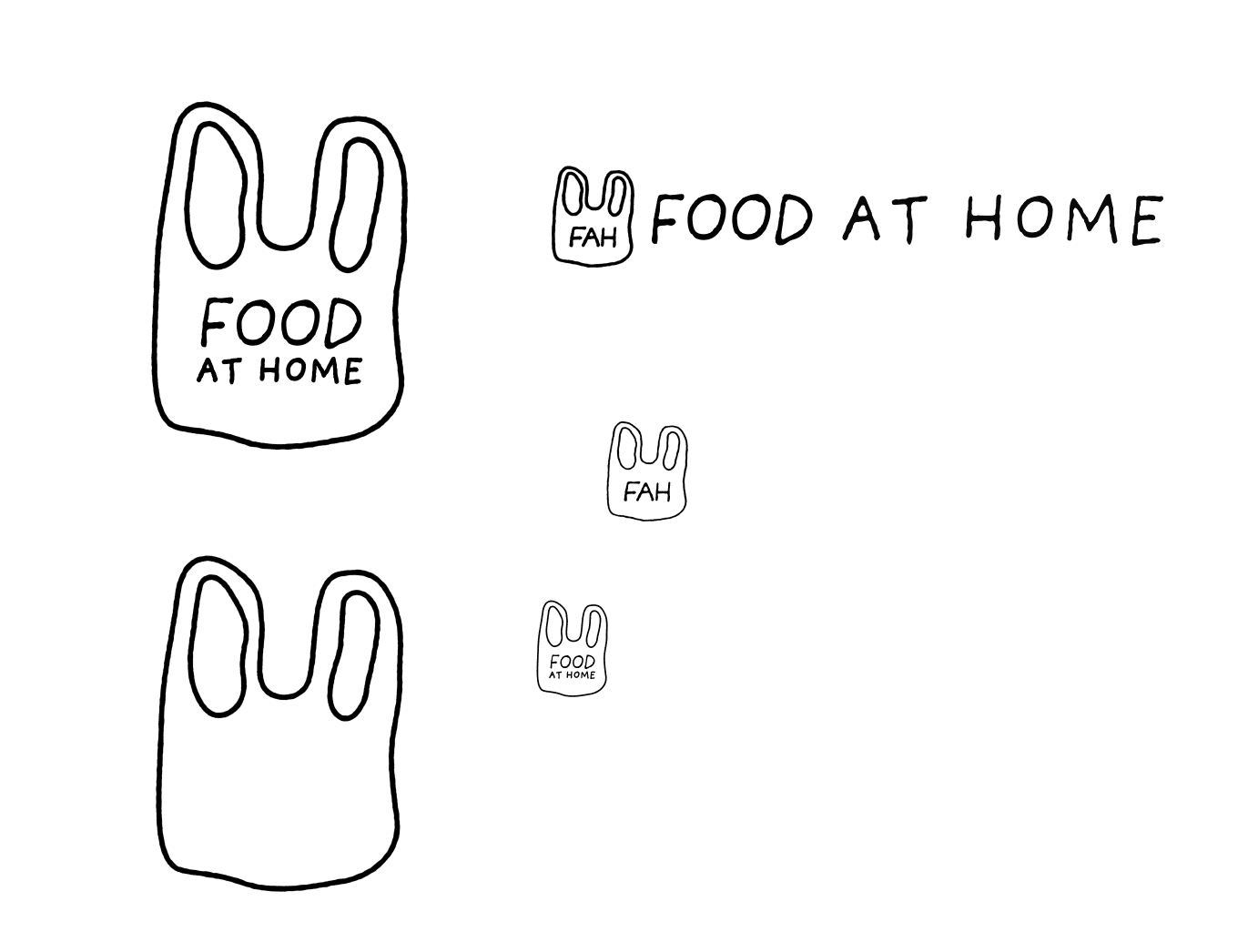
Thoughts on the logo? I will update more on Tuesday, pinky promise :P
Text can be bigger/thicker/bolder, more blobby like bubble letters
Yi Huan can help with the font and design
No shadow
Mid-fi prototype will be due on Friday, 11/21
After mid-fi, Maria will focus on the frontend
Need help from the content team with the framework for the badges system
Badge suggestions
FAH - Meeting Notes<- badges suggestion
Names
Beginner Tier with introductory badges
Ace Level Tier
To Do:
Implement feedback to mid-fi prototype
Implement colors
Continue work on logo, style guide, design system, etc.
Iconography for the navigation system, colored in = active, possibly adding circle background
Research
Closed Tasks:
Paper Prototype Interview Analysis
Insights are consolidated and sent off to Design
A/B Testing Script
Finalized for 3 color tests
Open Tasks:
A/B Testing Interviews
To Do:
Complete A/B Testing Interviews by Monday if possible
At least two interviews per person
Interviews and insights will be sent to the design team on Tuesday
Development
Closed Tasks:
Supabase > Dashboard > Food At Home > Food At Home > Table Editor (Left Sidebar) > Receipts
Open Tasks:
Database Development 2.0
Frontend
To Do:
Functionality
Dev notes for group meeting:
Discuss in All-Hands Meeting if we are setting up the badge system – if so, we need to develop the database and functions for it
Discuss with Content Team what information will be shown for badge icons
Set up the database and mock website; possibly do API test
Question Research Team if any component items part of the design will change from user feedback and what components are viable to be made right now
Dev will focus on frontend components this week and next
Group meeting notes for Dev team:
We are not fully building out the badge system, just showing a static page to show. Possibly do a trainee badge when you enter to show we have it.
Database should store unit
Components/pages that may change:
Changes to the insight and analytics portion
Active state of the nav bar may change
Components we can create right now:
Nav bar
Pop up modal
Create list, add item to list (refer to reminder app)
From scan receipt -> display list of items on the receipt, total of the receipt, store, date (include price, unit) -> edit/delete items
Drop down menu
Form to add new item (name, price, category [dropdown], quantity, unit, note)
Display graph(?) from the data
Filter, sort, different view option for inventory screen
Content
Open Tasks:
Reflect changes in Google Drive onto the Teams
Convert to WebP
Check off the system potentially? So all content members can split
To Do:
Case Study
Include progression photos
Badge System!
What information will be shown for the badge (information for dev)
Develop introductory badge (bleeds into design)
Download suggested badges system
Move into teams
Note:
Specify the files that were changed so we can have a concrete log of progress
Badge system easter egg!
6 badges form grapes
All-hands Meeting: (11/18/25) | 1.5 hrs
Attendees: All team members present and on time
Meeting Agenda:
General Updates
Update your section with what you will update the team about + double check jira to make sure everything is synced (5 min)
CHI event conflict for Friday meeting
You guys should attend… it’s Game Night…
URBN 125 at 6PM - 8PM
Rescheduling: Friday 11/21 4:15 - 5:15
Final Presentation
Would we be down to go 2nd if we can choose? – collective yes
Lets do our own practice presentation =D
Final Presentation: Dec 9th
Practice: Dec 6 10AM - 12PM @ URBN (dress business professional)
Practice: Dec 8 8PM @ URBN
Presentation Template: https://www.figma.com/slides/ZeFjeqPsFXQUSwZf88xaJ6/FAH---Final-Presentation?node-id=1-42&t=BhHfNumQrAohAWK4-1
Might change bg color
Scoot deliverables in as you’re working
Status Post 03
Start updating the status post as you work so we don’t cram last minute
Discord
Problem of push to talk only
Timeline (OLD):
11/18: Research - Finish A/B Test Findings by 5 PM, send to Design
11/18: Content - Download icons for devs
11/19: Dev - Start working root kit, building components, link icon library, add yen’s icons
Nav bar
11/21: Design - Finish Midfi Prototype
11/24: Research - Midfi Testing Finished by 8 PM
11/24: Research - Midfi Findings 11:59 PM
11/25: Start hi-fi prototype
11/29: Design - Finish Hifi Prototype
12/2: Alpha Deliverable and Status Post 3 Presentation BEFORE CLASS
12/6: Presentation Practice (business casual) - Saturday 10 AM
12/8: Final Presentation Run Through - Monday 8 PM
12/9: Final Presentation Tuesday 9:30 AM
TIMELINE (REVISED)
11/18: Research - Finish A/B Test Findings by 5 PM, send to Design
11/18: Content - Download icons for devs
11/19: Dev - Start working root kit, building components, link icon library, add yen’s icons
Nav bar
11/21: Design - Finish Midfi Prototype
11/24: Research - Midfi Testing Finished by 8 PM
11/24: Research - Midfi Findings 11:59 PM
11/25: Start hi-fi prototype
11/29: Design - Finish Hifi Prototype
12/2: Alpha Deliverable and Status Post 3 Presentation BEFORE CLASS
12/6: Presentation Practice (business casual) - Saturday 10 AM
12/8: Final Presentation Run Through - Monday 8 PM
12/9: Final Presentation Tuesday 9:30 AM
Questions
Are we doing the alpha? : yes (front end dev) NO we are not
What is the timeframe for Status Post 3: Nov 11 - Dec 2
Design
Closed Tasks:
Color wireframe for A/B test
Open Tasks:
Design system
Working on color kit – waiting on A/B testing results
Adding border/margin rules
Figma Variables – Dev Rootkit
Finalized icons are in the section
Download icons in svg format
Implement changes to the mid-fidelity prototype
To Do:
Implement feedback, colors, typeface, etc.
Creating components
Finalize logo
Bag with F [house icon] H for smaller scale man logo
Research
Closed Tasks:
A/B Testing Script
A/B Testing
We got 9 in total! Yippee
8 recorded
1 written
Need to finish adding recordings oopsies
Open Tasks:
A/B Testing Findings
Finish by 5 PM
Should be ready to hand off to design for their meeting
Create graphs and simplified findings (ex: 60% of users said…)
Transitions well to final presentation
Mid-Fi Interview Script
Format set up by Yi Huan, first run through finished
Will finalize by Friday, along with Design’s finalized prototype
Throw in final tasks for Mid-Fi interview script
To Do:
Mid-Fi Interviews - Nov
Mid-Fi Interview Findings (set up in Jira)
Development
Closed Tasks:
Database Development
Supabase > Dashboard > Food At Home > Food At Home > Table Editor (Left Sidebar) > Receipts
*Insert “Measurements (oz, lb, other, etc.) Column”
Open Tasks:
Frontend Development
To Do:
Functionality (11/30)
Pulling info from database (receipt scanning process and spitting that info out)
**not the API
Will do a single instance of API to see it fully functioning for the Final presentation
Jervo Q: Should we prioritize API or Alpha interface
*Include automatic input date
Create Rootkit (11/19)
Based off variables in Figma - Design file
Import icon library (11/19)
Based on Yen’s reference: https://lucide.dev/guide/installation
Components (11/26)
Create list → add item to list (refer to Apple Reminder app)
Scan receipt → display list of items from the receipt → total of the receipt, store, date, price, unit → edit/delete items
Form for Manually Adding Items (name, price, category [dropdown], quantity, unit, note)
Data (Graphs, Bar Charts, Etc.)
Filter, sort, different view option for inventory screen
Content
Closed Tasks:
11/18: Download icons that Yen created
Uploaded to drive and Teams
Ready for Dev
Open Tasks:
11/21: Clean up and sync Google Drive and Teams by hopefully end of the week
Mainly cleaned the research folder
Dev - icons
11/25: WEBPs
Check off the system potentially? So all content members can split
To Do:
11/25: Case Study
Include progression photos
11/20: Badge System!
What information will be shown for the badge (information for dev)
Develop introductory badge (bleeds into design)
11/20: Download suggested badges system
Move into Teams
Things needed from Team (please move into drive so I can optimize and organize)
Design:
Logos (Yen)
jpg format (brainstorm/sketch + final logo)
svg format (Final)
Research:
A/B Testing Videos (Sreeja ✅ + Yi Huan)
Paper Prototype (Fei + Yi Huan)
Sell by date, best by date,
All-hands Meeting: (11/21/25) | 1.5 hrs
Attendees: All team members present and on time
Meeting Agenda:
General Updates
Update your section with what you will update the team about (5 min)
FILL IT OUT FILL IT OUT – at least fill out all of the closed tasks
Make sure task names match Jira
Due Dec 2nd
Final Presentation
Revised Timeline
11/18: Research - Finish A/B Test Findings by 5 PM, send to Design
11/18: Content - Download icons for devs
11/19: Dev - Start working root kit, building components, link icon library, add yen’s icons
Nav bar
11/21: Design - Finish Midfi Prototype
11/24: Research - Midfi Testing Finished by 8 PM
11/24: Research - Midfi Findings 11:59 PM
11/25: Start hi-fi prototype
11/29: Design - Finish Hifi Prototype
12/2: Alpha Deliverable and Status Post 3 Presentation BEFORE CLASS
12/6: Presentation Practice (business casual) - Saturday 10 AM
12/8: Final Presentation Run Through - Monday 8 PM
12/9: Final Presentation Tuesday 9:30 AM
Design
Closed Tasks:
Open Tasks:
Working on mid-fidelity prototype
To Do:
Assets for 2nd A/B testing
Finish mi-fi prototype
Research
Closed Tasks:
A/B Testing Interviews (with recordings) and Findings
Open Tasks:
Mid-Fi Script
Mid-Fi Testing
A/B Testing Round 2
To Do:
Finish Mid-Fi Script (add in user tasks based on prototype)
Finish A/B Testing form (based on samples)
Send out to get as many responses as possible
Mid-Fi Testing Interviews (need to determine when we’ll get the prototype)
Revisit Due Dates
Development
Closed Tasks:
Imported Icon Library - ICONS.md
Create Rootkit (src > lib > styles > tokens)
Open Tasks:
To Do:
Components (11/26)
Create list → add item to list (refer to Apple Reminder app)
Scan receipt → display list of items from the receipt → total of the receipt, store, date, price, unit → edit/delete items
Form for Manually Adding Items (name, price, category [dropdown], quantity, unit, note)
Data (Graphs, Bar Charts, Etc.)
Filter, sort, different view option for inventory screen
Content
Closed Tasks:
Badge system
Open Tasks:
WEBPs
Organize Teams and Google Drive
All-hands Meeting: (11/25/25) | 1.5 hrs
Attendees: Yi Huan, Yen, Fei, Maria, Reuben (Sreeja asynch)
Meeting Agenda:
General Updates
Update your section with what you will update the team about (5 min)
Jira tasks synced up (5 min)
Look over 11/21 meeting notes (3 min)
Status Post 03
All closed tasks and meeting notes by 11/28
Working over Thanksgiving boundaries
Text if anything urgent – if no texting at all message the gc that day
Maria – (267) 455-8876
Yi Huan – (215) 433-0185
Fei - (215) 718-7380
Sreeja - (551) 255 - 6077
Reuben:
Thursday: Unable to work that day
Midfi - Timeline
Prototype due 11/25 – Yen @ research channel when done
Script due 11/26 morning 10am ish
Testing due 11/28
Findings due 11/28
Questions
Are we meeting on Friday 11/28? (1 hr max) - 4:30 PM - 5:30 PM
Have we decided on a Junior Project Celebration date? Or are we cancelling?
12/9 6PM
Are we all alright or are we all alleft?
I’m not gonna lie I had a stroke LOL strome
Design
Closed Tasks:
Mid-fi is done (i think so maybe 90% but it’s ready for testing)
Content: how to navigate through the app content
Design system is mostly done, just need some clean up
Open Tasks:
Add how to use section
Update achievement badges
To Do:
Fix bugs if needed
Logo logo logo
Decide on background color
Work on badges design while waiting for midfi user testing
Complete style guide for case study purpose
Look into category component fixture (is there a faster way @maria)
Research
Closed Tasks:
A/B Testing Interviews (with recordings)
A/B Testing Findings
A/B 2.0 Form – due by 11/26
Open Tasks:
Mid-Fi Script - FAH - MidFi Script
Mid-Fi Testing
A/B Testing Round 2
Responder Link: link
To Do:
Finish Mid-Fi Script (add in user tasks based on prototype)
Mid-Fi Testing Interviews (need to determine when we’ll get the prototype)
A/B 2.0 Findings Analysis
Revisit Due Dates
Development
Notes:
Discussing the need for components and backend functionality, what to focus/target if we are utilizing them this quarter.
Show high fidelity prototype & live product link (e.g., foodathome.com).
Can the link be hosted through vercel (e.g., foodathome.vercel.com)?
Send Jervo an email asking if he wants the live product link for himself or for presentation.
Answer: Yes, the live product link must be included in the presentation for both Jervo and our audience!
Closed Tasks:
Frontend Development (Icon Library + Rootkit complete)
Open Tasks:
Need confirmation on Components
Jervo might question what dev has been doing the whole term, so might be useful to still have this
Move this to Sprint 5
To Do:
Create live product link for Final Presentation (e.g., foodathome.com)
Create a mockup page by 12/02
Similar to Receipt Scanner API, except use Supabase database
User flow: user “scans” a receipt then information becomes displayed
Base it on the Figma - Design page/screens
Does NOT have to be pretty… can be pure HTML
Update Rootkit based on Yen’s Token variables
Content
Closed Tasks:
Badge System FAH - Meeting Notes
Categories
How are we measuring achievements?
Open Tasks:
Organizing and Syncing Teams and Drive (SORRY THIS IS TAKING SO LONG AHH)
Icons updated, just need to be downloaded by Figma won’t let me T_T
WebPs
To Do:
Case Study Progress images should be added to the drive (over break)
How to navigate through the app content (in cahoots with design)
All-hands Meeting: (11/28/25) | 10 min
Attendees: All team members present and on time
Meeting Agenda:
General Updates
Update your section with what you will update the team about (5 min)
Final Presentation
Would we be down to go 2nd if we can choose? – collective yes
Lets do our own practice presentation =D
Final Presentation: Dec 9th
Practice: Dec 6 10AM - 12PM @ URBN (dress business professional)
Practice: Dec 8 8PM @ URBN
Presentation Template: https://www.figma.com/slides/ZeFjeqPsFXQUSwZf88xaJ6/FAH---Final-Presentation?node-id=1-42&t=BhHfNumQrAohAWK4-1
Status Post 03:
Status Post 03 Presentation is in FOUR Days
FILL IT OUT FILL IT OUT FILL IT OUT
Design
Closed Tasks
Mid fi prototype
Open Tasks
Illustration for badges system
To Do
Add content to how to use section
Add grid view
Update interaction for category navbar
changed canned to pantry
changed meals to leftover
added grid view
added desserts
change secondary color
update category navbar color
combine overview and analytics
change icon of metric
add price input for item added manually
add edit pop-up model for items after scan to edit
fix microinteraction of toss-chomp item card
fix filter dropdown in inventory
add badges system
create badges microinteraction for badges
add how to use guide
Research
Closed Tasks:
A/B 2.0 Testing: Forms and Findings sent to Design
Mid-Fi Script: FAH - MidFi Script
Mid-Fi Interviews: 4 Completed
Make sure to upload recordings to Drive and Teams!
Open Tasks:
Mid-Fi Testing Findings: FAH - Mid-Fidelity Testing Findings
Will finalize by tonight and send to Design
To Do:
Finish consolidating Findings
Map out potential changes to screens
Update Status Post 3 Details
Development
Closed Tasks
Open Tasks
Status post 03
To Do
Create live product link for Final Presentation (e.g., foodathome.com)
Create a mockup page by 12/02
Similar to Receipt Scanner API, except use Supabase database
User flow: user “scans” a receipt then information becomes displayed
Base it on the Figma - Design page/screens
Does NOT have to be pretty… can be pure HTML
Update Rootkit based on Yen’s Token variables
Content
Closed Tasks:
Open Tasks:
Organizing and Syncing Teams and Drive (SORRY THIS IS TAKING SO LONG AHH)
Icons updated, just need to be downloaded by Figma won’t let me T_T
WebPs
To Do:
Case Study Progress images should be added to the drive (over break)
How to navigate through the app content (in cahoots with design)
Design Meeting: (11/20/25) | 1 hr
Attendees: Yen, Fei, Maria
Meeting Agenda:
Look at A/B testing findings
Discuss about new color palette
Discuss about feedback to make changes to mid-fidelity
Note
Color Palette
Sticking close to Version B
60% Gray (BG), 30% (Green), 10% (Purple)
40% can change depending on the page, especially for the categories on the inventory page
Changes
Categories
Add category labels (12 px) to the icons to avoid confusion
Neutral 400 on item cards for distinction
User test for readability (research team)
Style Guide (Adding this for my own organization, feel free to further refine – Fei)
Quicksand
H6: Bold 20px (header)
H5: Bold 24px (title)
Nunito
Regular 14px Neutral 400 (category in item cards)
Regular 14px (navigation)
Medium 12px (category text)
Medium 16px (regular body) (button text)
Bold 16px (leading body)
24 px between columns
32 px by 16 px padding
Design Meeting: (11/13/25) | 1 hr
Attendees: Yen, Maria
Meeting Agenda:
Look over paper prototype findings
Discuss findings
Add notes to mid-fi prototype on Figma for implementation
Implement feedback (on our own times)
Note
Insights page with monthly view might cause info overload
Users expect to see daily instead of monthly
Change the name of label (insights and analytics)
Metrics
Data
Activities
Budget
Action Items
Add suggestion
Duplicate for mid-fi and start implementing feedback + additional changes (11/21)
Dev Meeting: (11/13/25) | 1 hr
Attendees: Reuben, Maria
Meeting Agenda:
Backend Functionality
Reuben’s task
Database
Maria’s task
Supabase is connected, but there is no information in it
Use placeholder information
Categories
Food names
Price of product
QT of product
Date
Store name
Receipt subtotal
Potentially start creating table for badge system
Frontend Development
All of dev team
Create components
Buttons, grids, microinteractions
Develop navbar this week (?)
Note
Discuss in All-Hands Meeting if we are setting up the badge system – if so, we need to develop the database and functions for it
Discuss with Content Team what information will be shown for badge icons
Set up the database and mock website; possibly do API test
Question Research Team if any component items part of the design will change from user feedback and what components are viable to be made right now
Dev will focus on frontend components this week and next
Team Meeting 13 (11/14)
Not fully building out the badge system – only showing a static page
Possibly a trainee badge when the user enters to indicate presence.
Database should store units
Components that may change:
Insights / Analytics
Active state of the nav bar
Components we can create now:
Navigation Bar
Pop-up Modals
Create list → add item to list (refer to Apple Reminder app)
Scan receipt → display list of items from the receipt → total of the receipt, store, date, price, unit → edit/delete items
Dropdown Menus
Form for Manually Adding Items (name, price, category [dropdown], quantity, unit, note)
Data (Graphs, Bar Charts, Etc.)
Filter, sort, different view option for inventory screen